The Essential Business Card Dimension Reference Chart
Whether you are designing a visiting card in Adobe Photoshop, Illustrator, CorelDRAW, or Canva, getting your canvas pixel dimensions and bleed boundaries right from the start is critical. Setting up incorrect dimensions leads to fuzzy text, sliced contact details, or unwanted white borders along the edge.
Below is the definitive cross-format dimension cheat sheet for the most popular business card formats in India and internationally, calibrated at the print-standard 300 DPI (Dots Per Inch) resolution:
| Card Format | Trim Size (MM) | Trim Size (CM) | Trim Size (Inches) | Canvas Pixels @ 300 DPI (with Bleed) |
|---|---|---|---|---|
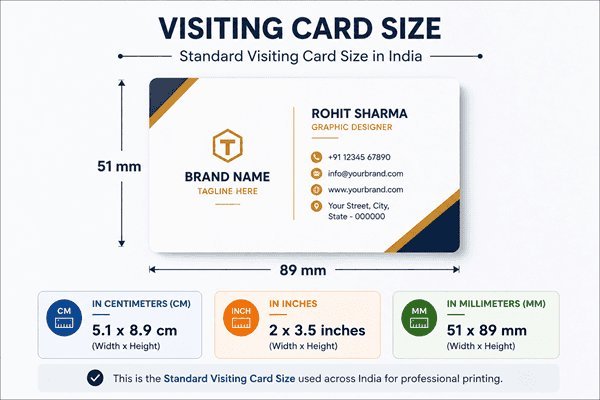
| Standard Indian & US Profile | 89 × 51 mm | 8.9 × 5.1 cm | 3.5" × 2.0" | 1098 × 650 px (93 × 55 mm) |
| Modern Square Business Card | 63.5 × 63.5 mm | 6.35 × 6.35 cm | 2.5" × 2.5" | 797 × 797 px (67.5 × 67.5 mm) |
| European Standard Profile | 85 × 55 mm | 8.5 × 5.5 cm | 3.34" × 2.16" | 1051 × 697 px (89 × 59 mm) |
| Credit Card / Plastic ID Size | 85.6 × 53.98 mm | 8.56 × 5.4 cm | 3.37" × 2.125" | 1058 × 685 px (89.6 × 58 mm) |
The Anatomy of Pre-Press Layout: Bleed, Trim & Safe Zone
To guarantee that your visiting cards come out of the guillotine cutter looking crisp without clipped letters or uneven borders, every professional file setup must respect three concentric boundary zones:
- Bleed Area (Outer Red Line): Extend any background color, pattern, or full-width photo 2mm beyond the finished trim line on all four edges. If the cutting blade shifts fractionally outwards, having bleed prevents unsightly white paper strips along the edge.
- Trim Line (Cut Line): The final physical dimension of your visiting card after mechanical cutting (e.g., exactly 89 × 51 mm for standard cards, or 63.5 × 63.5 mm for Square Business Cards).
- Safe Zone (Inner Green Margin): Keep all crucial graphic elements—names, phone numbers, email addresses, corporate logos, and QR codes—at least 3mm to 4mm inside the trim line. This safeguards vital text from being nicked during rapid bulk stack cutting.
Resolution Checklist: Why 300 DPI Is Non-Negotiable
Digital computer monitors display images at 72 to 96 PPI (Pixels Per Inch), which makes low-resolution web graphics look sharp on screen. However, industrial digital presses require at least 300 DPI to produce crisp, high-density print without pixelation or jagged letter edges.
- Raster Graphics (Photos): Always supply photographic elements at a minimum of 300 DPI at 100% reproduction scale.
- Vector Typography & Logos: Keep your logo and contact text as pure vector paths (EPS, AI, or Vector PDF). Vectors scale infinitely without loss of sharpness.
- Color Mode: Convert your document workspace to CMYK (Coated FOGRA39 or US Web Coated SWOP v2) to guarantee accurate color fidelity on physical paper.
Choosing Cardstock Thickness (GSM & Finishes)
Dimensions establish the visual geometry, but cardstock thickness delivers the physical handshake:
- 300 GSM Art Board: The standard commercial baseline in India. Rigid, professional, and economical for mass team distribution.
- 350 GSM Heavyweight Board: Noticeably stiffer and more substantial. Ideal for creative agencies and C-level executives.
- Thermal Laminations:
- Velvet Touch (Soft-Touch): Delivers a buttery peach-skin tactile feel with zero overhead glare.
- Silk Matte: Clean, understated contemporary aesthetic.
- High Gloss: Enhances photographic contrast and color saturation.